MoSAIC 2x2
About
Perl scripts in /tools/generate (such as mosaic_2x2.pl) are used to generate MoSAIC arrays. You can set the following parameters :
- MoSAIC array row and column sizes
- Tiles used in the MoSAIC array
- Icarus or Vivado simulation
- Simulation time
- C file paths (paths to C code that gives the Pico(s) instructions)
- Firmware path
- Checker files
- FPGA board type (u250 or u280)
- DDR4 inclusion
- DDR cache lines
- NoC Bandwidth
- etc.
Configuration Overview
This is a 2x2 mosaic array with Picos on tile 0 (000-000) and tile 9 (001-001), a loop on tile 1 (000-001) and an SPAD on tile 8 (001-000).
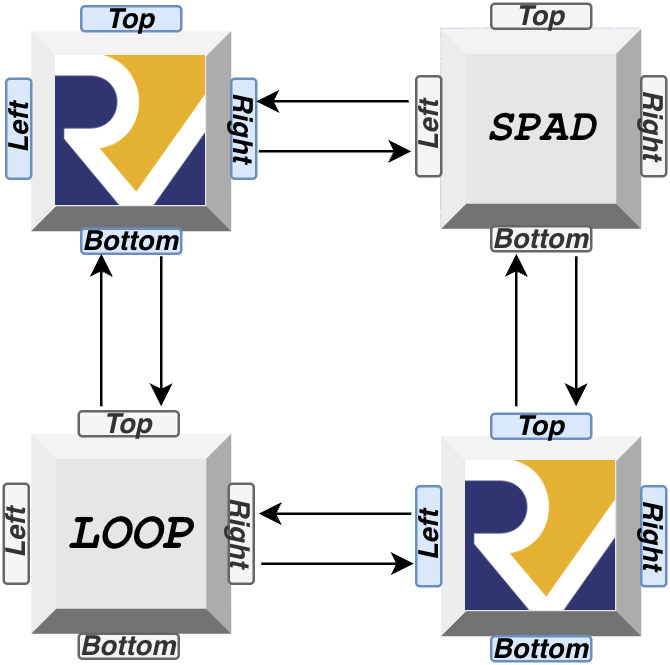
Running the Example
Setting Row and Column Parameters
#- 2x2 Tile array
$param{'r'} = 2;
$param{'c'} = 2;
Setting Tile Array and Hex Files
@tile_array = (['pico', 'spad'],
               ['loop', 'pico']);

@pico_program  = ('pico_scratchpad.hex', '', '', 'test_tile_nop.hex');
We can set tile positions with @tile_array. The hex files in @pico_program are firmware for the Pico processors. Hex files are generated based on user instructions written with C code. To see how to generate these files, click here
Setting Simulation Time
#- Simulation Time
$param{'sim_loop'}     = 260;
Here, we set how long we want the simulation to go for. Make sure the simulation has enough time, otherwise the checkers may report a false negative.
Setting Checker Files
#- Checkers
@checkers = ('check_pico_spad.sh');
Checkers are located in /tools/checkers. Checker files work by reading tile memory contents dumped into .dat files after the simulation is finished. Memory files can be found in /icarus/. Note that they will only work to see traffic caused by mPuts, and NOT qPuts.
Running a Simulation with Icarus
#- Running with Icarus
$param{'run_sim'} = 1;
Does not launch Vivado. Waveforms can be viewed by accessing /icarus/tb_mosaic.vcd. To conveniently view waveforms by simply opening this file in your IDE, download a waveform viewer extension such as Surfer for VSCode.
Running a Simulation with Vivado (mosaic_2x2_vivado.pl)
#- Running with Vivado
$param{'vivado'} = 1;
$param{'vivado_project'} = 1;
$param{'run_sim'} = 1;
Note that rerunning a perl script with vivado_project set to 1 will overwrite your waveform configurations! Make sure to save your waveform files.